# gradient-string
[![Build Status][build-src]][build-href]
[![Version][version-src]][version-href]
[![Codecov][codecov-src]][codecov-href]
[![Downloads][downloads-src]][downloads-href]
[![XO code style][xo-src]][xo-href]
[![Mentioned in Awesome Node.js][awesome-src]][awesome-href]
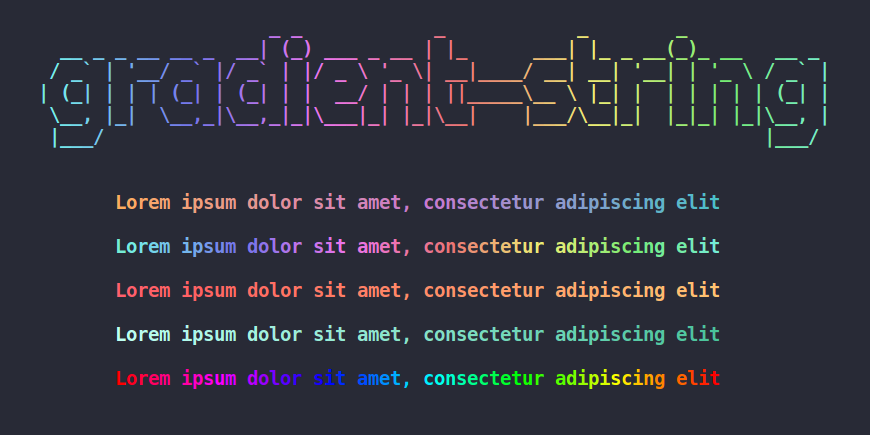
> Beautiful color gradients in terminal output
[](http://bit.ly/gradient-string-large)
## Install
```
$ npm i gradient-string
```
## Usage
```javascript
const gradient = require('gradient-string');
console.log(gradient('cyan', 'pink')('Hello world!'));
```
### Initialize a gradient
```javascript
// Using varargs
let coolGradient = gradient('red', 'green', 'blue');
// Using array
let coolGradient = gradient(['#FF0000', '#00FF00', '#0000FF']);
```
The colors are parsed with TinyColor, [multiple formats are accepted](https://github.com/bgrins/TinyColor/blob/master/README.md#accepted-string-input).
```javascript
let coolGradient = gradient([
tinycolor('#FFBB65'), // tinycolor object
{r: 0, g: 255, b: 0}, // RGB object
{h: 240, s: 1, v: 1, a: 1}, // HSVa object
'rgb(120, 120, 0)', // RGB CSS string
'gold' // named color
]);
```
### Use a gradient
```javascript
let coolString = coolGradient('This is a fancy string!');
console.log(coolString);
```
## Built-in gradients
### Usage
```javascript
const gradient = require('gradient-string');
// Use the rainbow gradient
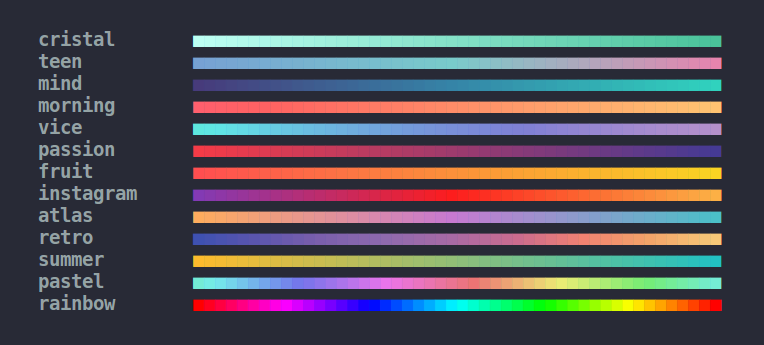
console.log(gradient.rainbow('I love gradient-strings!'))
```
### Available built-in gradients
[](http://bit.ly/2ufX07r)
## Multi line gradients
In some cases, you may want to apply the same horizontal gradient on each line of a long text (or a piece of ASCII art).
You can use the `multiline()` method of a gradient to ensure that the colors are vertically aligned.
```javascript
const gradient = require('gradient-string');
// Use the same gradient on every line
let duck = gradient('orange', 'yellow').multiline([
" __",
"<(o )___",
" ( ._> /",
" `---'",
].join('\n'));
console.log(duck);
// Works with aliases
gradient.atlas.multiline('Multi line\nstring');
// Works with advanced options
gradient('cyan', 'pink').multiline('Multi line\nstring', {interpolation: 'hsv'});
```
## Advanced gradients
There are also more advanced options for gradient customization, such as custom color stops, or choice of color interpolation
### Custom color stops
By default, the gradient color stops are distributed equidistantly.
You can specify the position of each color stop (between `0` and `1`), using the following syntax:
```javascript
let coolGradient = gradient([
{color: '#d8e0de', pos: 0},
{color: '#255B53', pos: 0.8},
{color: '#000000', pos: 1}
]);
```
### Color interpolation
When using a gradient, you can actually add a second parameter to choose how the colors will be generated.
Here is the full gradient API:
#### myGradient(text, [options])
##### text
Type: `string`
String you want to color.
##### options
Type: `Object`
###### interpolation
Type: `string`
The gradient can be generated using RGB or HSV interpolation. HSV usually produces brighter colors.
`interpolation` can be set to `rgb` for RGB interpolation, or`hsv` for HSV interpolation.
Defaults to `rgb`. Case insentitive
###### hsvSpin
Type: `string`
Used only in the case of HSV interpolation.
Because hue can be considered as a circle, there are two ways to go from a color to another color.
`hsvSpin` can be either `short` or `long`, depending on if you want to take the shortest or the longest way between two colors.
Defaults to `short`. Case insensitive
#### Example
##### Code
```javascript
const redToGreen = gradient('red', 'green');
const str = '■'.repeat(48);
// Standard RGB gradient
console.log(redToGreen(str));
// Short HSV gradient: red -> yellow -> green
console.log(redToGreen(str, {interpolation: 'hsv'}));
// Long HSV gradient: red -> magenta -> blue -> cyan -> green
console.log(redToGreen(str, {interpolation: 'hsv', hsvSpin: 'long'}));
```
##### Result

## Typescript
Typescript definitions of gradient-string are available on [DefinitelyTyped](https://www.npmjs.com/package/@types/gradient-string)
```sh
npm i @types/gradient-string
```
## Dependencies
- [tinygradient](https://github.com/mistic100/tinygradient) - Generate gradients
- [chalk](https://github.com/chalk/chalk) - Output colored text to terminal
## License
MIT © [Boris K](https://github.com/bokub)
[build-src]: https://flat.badgen.net/travis/bokub/gradient-string
[version-src]: https://runkit.io/bokub/npm-version/branches/master/gradient-string?style=flat
[codecov-src]: https://flat.badgen.net/codecov/c/github/bokub/gradient-string
[downloads-src]: https://flat.badgen.net/npm/dm/gradient-string?color=FF9800
[xo-src]: https://flat.badgen.net/badge/code%20style/XO/5ed9c7
[awesome-src]: https://awesome.re/mentioned-badge-flat.svg
[build-href]: https://travis-ci.org/bokub/gradient-string
[version-href]: https://www.npmjs.com/package/gradient-string
[codecov-href]: https://codecov.io/gh/bokub/gradient-string
[downloads-href]: https://www.npmjs.com/package/gradient-string
[xo-href]: https://github.com/sindresorhus/xo
[awesome-href]: https://github.com/sindresorhus/awesome-nodejs